유니티 로얄 - Unity Royal 샘플 코드 분석
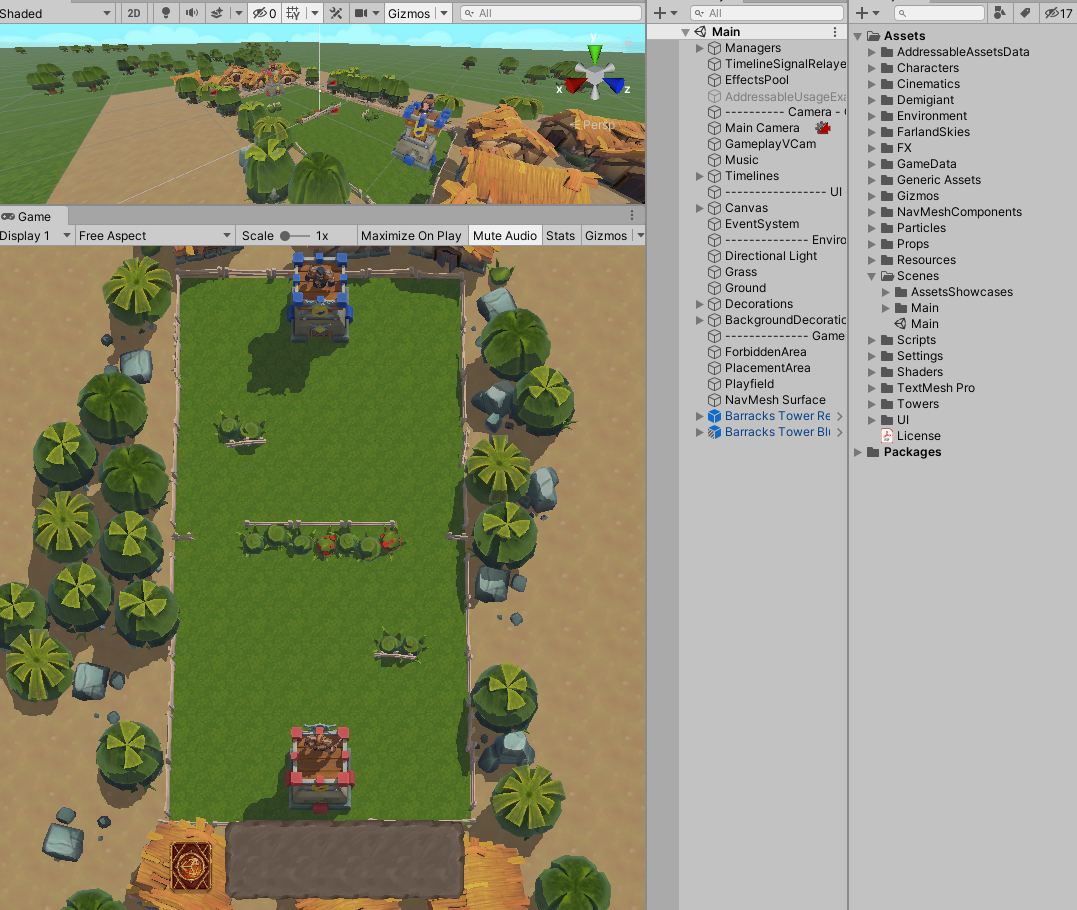
유니티 로얄 샘플 프로젝트를 코드 분석을 진행했다.
본인의 개인적인 시각으로 코드를 분석한 것임을 참고하면 좋겠다.
게임 플레이영상은 다음과 같다.
동영상 서비스가 종료되어 해당 콘텐츠를 재생할 수 없습니다.
프로젝트 Git 주소 : [링크]
ciro-unity/UnityRoyale-Public
Public release of the Unity Royale project. All of the assets are redistributable. - ciro-unity/UnityRoyale-Public
github.com
GameManager에서 기본적으로 gameOver가 아닐 경우의 배치에 포함된 Unity 유닛의 상태를 처리하고 발사체도 처리한다.
private void Update()
        {
            if(gameOver)
                return;

            ThinkingPlaceable targetToPass; //ref
			ThinkingPlaceable p; //ref

			for(int pN=0; pN<allThinkingPlaceables.Count; pN++)
            {
                p = allThinkingPlaceables[pN];

                if(updateAllPlaceables)
                    p.state = ThinkingPlaceable.States.Idle; //forces the assignment of a target in the switch below

                switch(p.state)
                {
                    case ThinkingPlaceable.States.Idle:
                        //this if is for innocuous testing Units
                        if(p.targetType == Placeable.PlaceableTarget.None)
                            break;

                        //find closest target and assign it to the ThinkingPlaceable
                        bool targetFound = FindClosestInList(p.transform.position, GetAttackList(p.faction, p.targetType), out targetToPass);
                        if(!targetFound) Debug.LogError("No more targets!"); //this should only happen on Game Over
                        p.SetTarget(targetToPass);
						p.Seek();
                        break;


                    case ThinkingPlaceable.States.Seeking:
						if(p.IsTargetInRange())
                    	{
							p.StartAttack();
						}
                        break;


					case ThinkingPlaceable.States.Attacking:
						if(p.IsTargetInRange())
						{
							if(Time.time >= p.lastBlowTime + p.attackRatio)
							{
								p.DealBlow();
								//Animation will produce the damage, calling animation events OnDealDamage and OnProjectileFired. See ThinkingPlaceable
							}
						}
						break;

					case ThinkingPlaceable.States.Dead:
						Debug.LogError("A dead ThinkingPlaceable shouldn't be in this loop");
						break;
                }
            }

			Projectile currProjectile;
			float progressToTarget;
			for(int prjN=0; prjN<allProjectiles.Count; prjN++)
            {
				currProjectile = allProjectiles[prjN];
				progressToTarget = currProjectile.Move();
				if(progressToTarget >= 1f)
				{
					if(currProjectile.target.state != ThinkingPlaceable.States.Dead) //target might be dead already as this projectile is flying
					{
						float newHP = currProjectile.target.SufferDamage(currProjectile.damage);
						currProjectile.target.healthBar.SetHealth(newHP);
					}
					Destroy(currProjectile.gameObject);
					allProjectiles.RemoveAt(prjN);
				}
			}

            updateAllPlaceables = false; //is set to true by UseCard()
        }
Unit 클래스는 다음과 같다. 각 상태에 따른 애니메이션과 각종 유닛 수치에 따른 세팅 및 처리를 진행한다.
namespace UnityRoyale
{
    //humanoid or anyway a walking placeable
    public class Unit : ThinkingPlaceable
    {
        //data coming from the PlaceableData
        private float speed;

        private Animator animator;
        private NavMeshAgent navMeshAgent;

        private void Awake()
        {
            pType = Placeable.PlaceableType.Unit;

            //find references to components
            animator = GetComponent<Animator>();
            navMeshAgent = GetComponent<NavMeshAgent>(); //will be disabled until Activate is called
			audioSource = GetComponent<AudioSource>();
        }

        //called by GameManager when this Unit is played on the play field
        public void Activate(Faction pFaction, PlaceableData pData)
        {
            faction = pFaction;
            hitPoints = pData.hitPoints;
            targetType = pData.targetType;
            attackRange = pData.attackRange;
            attackRatio = pData.attackRatio;
            speed = pData.speed;
            damage = pData.damagePerAttack;
			attackAudioClip = pData.attackClip;
			dieAudioClip = pData.dieClip;
            //TODO: add more as necessary

            navMeshAgent.speed = speed;
            animator.SetFloat("MoveSpeed", speed); //will act as multiplier to the speed of the run animation clip

            state = States.Idle;
            navMeshAgent.enabled = true;
        }

        public override void SetTarget(ThinkingPlaceable t)
        {
            base.SetTarget(t);
        }

		//Unit moves towards the target
        public override void Seek()
        {
            if(target == null)
                return;

            base.Seek();

            navMeshAgent.SetDestination(target.transform.position);
            navMeshAgent.isStopped = false;
            animator.SetBool("IsMoving", true);
        }

		//Unit has gotten to its target. This function puts it in "attack mode", but doesn't delive any damage (see DealBlow)
        public override void StartAttack()
        {
            base.StartAttack();

            navMeshAgent.isStopped = true;
            animator.SetBool("IsMoving", false);
        }

		//Starts the attack animation, and is repeated according to the Unit's attackRatio
        public override void DealBlow()
        {
            base.DealBlow();

            animator.SetTrigger("Attack");
            transform.forward = (target.transform.position - transform.position).normalized; //turn towards the target
        }

		public override void Stop()
		{
			base.Stop();

			navMeshAgent.isStopped = true;
			animator.SetBool("IsMoving", false);
		}

        protected override void Die()
        {
            base.Die();

            navMeshAgent.enabled = false;
            animator.SetTrigger("IsDead");
        }
    }
}
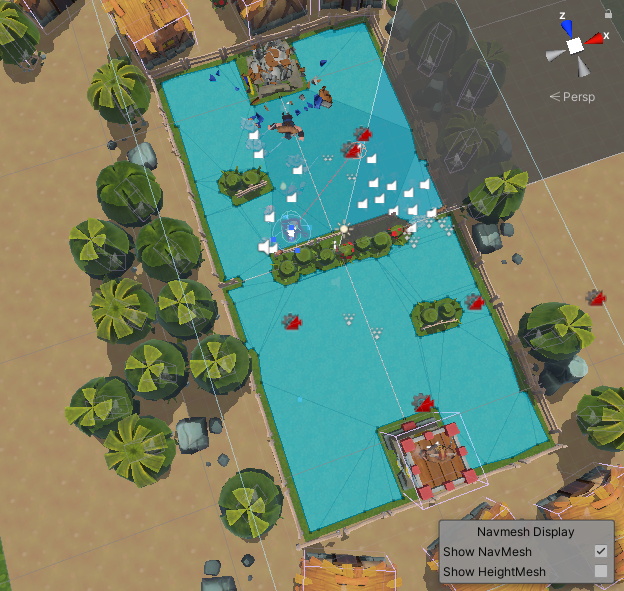
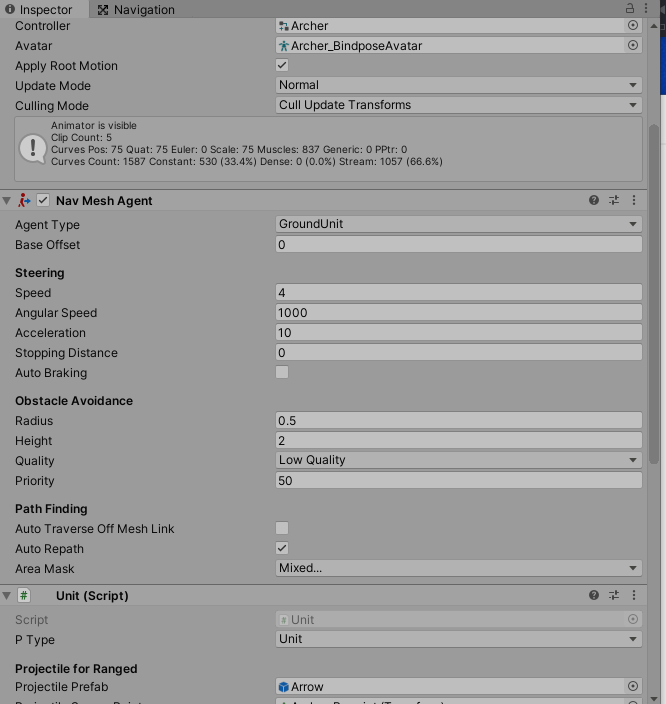
Navmesh Agent를 각 Unity Prefab이 포함되어있어서 타겟을 기준으로 길 찾기 및 타깃 이동을 처리가 된 것을 확인 가능했다.
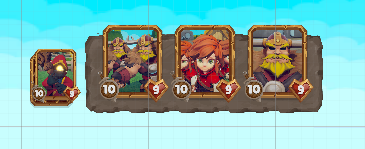
카드 매니져를 통해서 UI에 있는 카드를 컨트롤 구성되어있다.
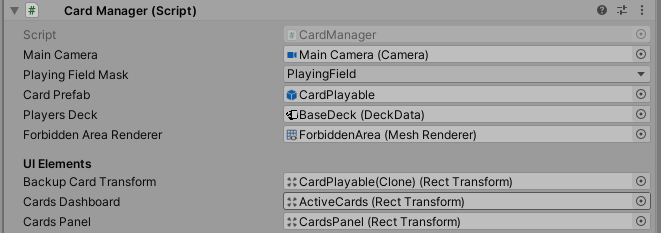
namespace UnityRoyale
{
    public class CardManager : MonoBehaviour
    {
        public Camera mainCamera; //public reference
        public LayerMask playingFieldMask;
        public GameObject cardPrefab;
        public DeckData playersDeck;
		public MeshRenderer forbiddenAreaRenderer;

        public UnityAction<CardData, Vector3, Placeable.Faction> OnCardUsed;

        [Header("UI Elements")]
        public RectTransform backupCardTransform; //the smaller card that sits in the deck
        public RectTransform cardsDashboard; //the UI panel that contains the actual playable cards
        public RectTransform cardsPanel; //the UI panel that contains all cards, the deck, and the dashboard (center aligned)

        private Card[] cards;
        private bool cardIsActive = false; //when true, a card is being dragged over the play field
        private GameObject previewHolder;
        private Vector3 inputCreationOffset = new Vector3(0f, 0f, 1f); //offsets the creation of units so that they are not under the player's finger

        private void Awake()
        {
            previewHolder = new GameObject("PreviewHolder");
            cards = new Card[3]; //3 is the length of the dashboard
        }

        public void LoadDeck()
        {
            DeckLoader newDeckLoaderComp = gameObject.AddComponent<DeckLoader>();
            newDeckLoaderComp.OnDeckLoaded += DeckLoaded;
            newDeckLoaderComp.LoadDeck(playersDeck);
        }

        //...

		private void DeckLoaded()
		{
            Debug.Log("Player's deck loaded");

            //setup initial cards
            StartCoroutine(AddCardToDeck(.1f));
            for(int i=0; i<cards.Length; i++)
            {
                StartCoroutine(PromoteCardFromDeck(i, .4f + i));
                StartCoroutine(AddCardToDeck(.8f + i));
            }
		}

        //moves the preview card from the deck to the active card dashboard
        private IEnumerator PromoteCardFromDeck(int position, float delay = 0f)
        {
            yield return new WaitForSeconds(delay);

            backupCardTransform.SetParent(cardsDashboard, true);
            //move and scale into position
            backupCardTransform.DOAnchorPos(new Vector2(210f * (position+1) + 20f, 0f),
                                            .2f + (.05f*position)).SetEase(Ease.OutQuad);
            backupCardTransform.localScale = Vector3.one;

            //store a reference to the Card component in the array
            Card cardScript = backupCardTransform.GetComponent<Card>();
            cardScript.cardId = position;
            cards[position] = cardScript;

            //setup listeners on Card events
            cardScript.OnTapDownAction += CardTapped;
            cardScript.OnDragAction += CardDragged;
            cardScript.OnTapReleaseAction += CardReleased;
        }

        //adds a new card to the deck on the left, ready to be used
        private IEnumerator AddCardToDeck(float delay = 0f) //TODO: pass in the CardData dynamically
        {
            yield return new WaitForSeconds(delay);

            //create new card
            backupCardTransform = Instantiate<GameObject>(cardPrefab, cardsPanel).GetComponent<RectTransform>();
            backupCardTransform.localScale = Vector3.one * 0.7f;

            //send it to the bottom left corner
            backupCardTransform.anchoredPosition = new Vector2(180f, -300f);
            backupCardTransform.DOAnchorPos(new Vector2(180f, 0f), .2f).SetEase(Ease.OutQuad);

            //populate CardData on the Card script
            Card cardScript = backupCardTransform.GetComponent<Card>();
            cardScript.InitialiseWithData(playersDeck.GetNextCardFromDeck());
        }

        private void CardTapped(int cardId)
        {
            cards[cardId].GetComponent<RectTransform>().SetAsLastSibling();
			forbiddenAreaRenderer.enabled = true;
        }

        private void CardDragged(int cardId, Vector2 dragAmount)
        {
            cards[cardId].transform.Translate(dragAmount);

            //raycasting to check if the card is on the play field
            RaycastHit hit;
            Ray ray = mainCamera.ScreenPointToRay(Input.mousePosition);

            bool planeHit = Physics.Raycast(ray, out hit, Mathf.Infinity, playingFieldMask);

            if(planeHit)
            {
                if(!cardIsActive)
                {
                    cardIsActive = true;
                    previewHolder.transform.position = hit.point;
                    cards[cardId].ChangeActiveState(true); //hide card

                    //retrieve arrays from the CardData
                    PlaceableData[] dataToSpawn = cards[cardId].cardData.placeablesData;
                    Vector3[] offsets = cards[cardId].cardData.relativeOffsets;

                    //spawn all the preview Placeables and parent them to the cardPreview
                    for(int i=0; i<dataToSpawn.Length; i++)
                    {
                        GameObject newPlaceable = GameObject.Instantiate<GameObject>(dataToSpawn[i].associatedPrefab,
                                                                                    hit.point + offsets[i] + inputCreationOffset,
                                                                                    Quaternion.identity,
                                                                                    previewHolder.transform);
                    }
                }
                else
                {
                    //temporary copy has been created, we move it along with the cursor
                    previewHolder.transform.position = hit.point;
                }
            }
            else
            {
                if(cardIsActive)
                {
                    cardIsActive = false;
                    cards[cardId].ChangeActiveState(false); //show card

                    ClearPreviewObjects();
                }
            }
        }

        private void CardReleased(int cardId)
        {
            //raycasting to check if the card is on the play field
            RaycastHit hit;
            Ray ray = mainCamera.ScreenPointToRay(Input.mousePosition);

            if (Physics.Raycast(ray, out hit, Mathf.Infinity, playingFieldMask))
            {
                if(OnCardUsed != null)
                    OnCardUsed(cards[cardId].cardData, hit.point + inputCreationOffset, Placeable.Faction.Player); //GameManager picks this up to spawn the actual Placeable

                ClearPreviewObjects();
                Destroy(cards[cardId].gameObject); //remove the card itself

                StartCoroutine(PromoteCardFromDeck(cardId, .2f));
                StartCoroutine(AddCardToDeck(.6f));
            }
            else
            {
                cards[cardId].GetComponent<RectTransform>().DOAnchorPos(new Vector2(220f * (cardId+1), 0f),
                                                                        .2f).SetEase(Ease.OutQuad);
            }

			forbiddenAreaRenderer.enabled = false;
        }

        //happens when the card is put down on the playing field, and while dragging (when moving out of the play field)
        private void ClearPreviewObjects()
        {
            //destroy all the preview Placeables
            for(int i=0; i<previewHolder.transform.childCount; i++)
            {
                Destroy(previewHolder.transform.GetChild(i).gameObject);
            }
        }
    }

}
Card Class는 다음과 같다. 심플하게 카드의 데이터의 데이터와 Input( touch , drag, down)에 대한 기능이 구현되어 있다.
namespace UnityRoyale
{
    public class Card : MonoBehaviour, IDragHandler, IPointerUpHandler, IPointerDownHandler
    {
        public UnityAction<int, Vector2> OnDragAction;
        public UnityAction<int> OnTapDownAction, OnTapReleaseAction;

        [HideInInspector] public int cardId;
        [HideInInspector] public CardData cardData;

        public Image portraitImage; //Inspector-set reference
        private CanvasGroup canvasGroup;

        private void Awake()
        {
            canvasGroup = GetComponent<CanvasGroup>();
        }

        //called by CardManager, it feeds CardData so this card can display the placeable's portrait
        public void InitialiseWithData(CardData cData)
        {
            cardData = cData;
            portraitImage.sprite = cardData.cardImage;
        }

        public void OnPointerDown(PointerEventData pointerEvent)
        {
            if(OnTapDownAction != null)
                OnTapDownAction(cardId);
        }

        public void OnDrag(PointerEventData pointerEvent)
        {
            if(OnDragAction != null)
                OnDragAction(cardId, pointerEvent.delta);
        }

        public void OnPointerUp(PointerEventData pointerEvent)
        {
            if(OnTapReleaseAction != null)
                OnTapReleaseAction(cardId);
        }

        public void ChangeActiveState(bool isActive)
        {
            canvasGroup.alpha = (isActive) ? .05f : 1f;
        }
    }
}
처음 카메라워킹은 Unity의 기능인 Cinemachine을 사용해서 처리한듯하다.
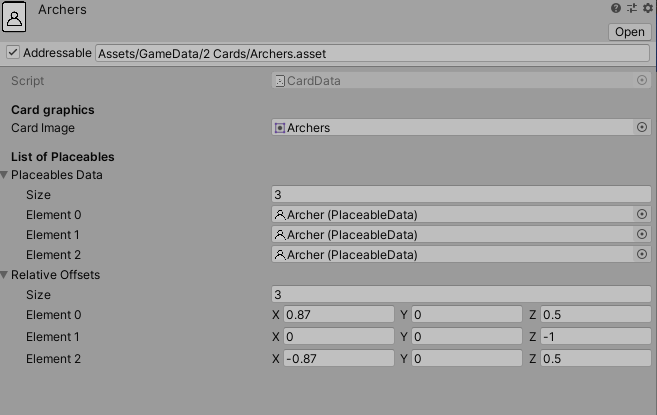
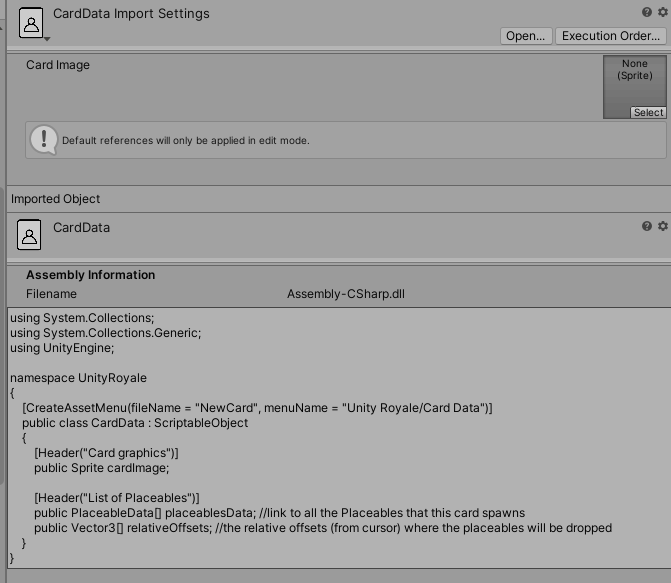
각 유닛의 데이터는 Addressable와 ScriptableObjects을 통해서 데이터를 구성했다. (에셋 번들 같은 것이라고 생각하면 된다.)
상대 CPU 플레이어는 카드를 특정기준마다 랜덤으로 선택해서 내도록 구성되어있다.
using System.Collections;
using System.Collections.Generic;
using UnityEngine;
using UnityEngine.Events;

namespace UnityRoyale
{
    public class CPUOpponent : MonoBehaviour
    {
        public DeckData aiDeck;
        public UnityAction<CardData, Vector3, Placeable.Faction> OnCardUsed;

        private bool act = false;
        private Coroutine actingCoroutine;

		public float opponentLoopTime = 5f;

        public void LoadDeck()
        {
            DeckLoader newDeckLoaderComp = gameObject.AddComponent<DeckLoader>();
            newDeckLoaderComp.OnDeckLoaded += DeckLoaded;
            newDeckLoaderComp.LoadDeck(aiDeck);
        }

        //...

		private void DeckLoaded()
		{
			Debug.Log("AI deck loaded");

			//StartActing();
        }

		public void StartActing()
		{
			Invoke("Bridge", 0f);
		}

        private void Bridge()
        {
            act = true;
            actingCoroutine = StartCoroutine(CreateRandomCards());
        }

        public void StopActing()
        {
            act = false;
            StopCoroutine(actingCoroutine);
        }

        //TODO: create a proper AI
		private IEnumerator CreateRandomCards()
		{
            while(act)
            {
			    yield return new WaitForSeconds(opponentLoopTime);


                if(OnCardUsed != null)
				{
					Vector3 newPos = new Vector3(Random.Range(-5f, 5f), 0f, Random.Range(3f, 8.5f));
                    OnCardUsed(aiDeck.GetNextCardFromDeck(), newPos, Placeable.Faction.Opponent);
				}
            }
		}
	}
}★★★☆☆
'개발 > Unity) 코드분석' 카테고리의 다른 글
| 코드분석) MegaMan-Unity-8Bit(메가멘 8비트) (0) | 2021.08.16 |
|---|---|
| 코드분석) 유전 알고리즘(카트) (0) | 2021.05.09 |
| 코드분석) Spy Game (0) | 2021.05.02 |
| 코드분석) Tower Defence Game (0) | 2021.04.11 |
| Unity)코드분석) Red Runner (0) | 2021.02.13 |


댓글