디졸브 (Dissolve) 효과

A 에서 B로 자연스러운 전이할때 많이 사용하는 디졸브 효과로
노이즈 텍스쳐를 사용해서 서로 스왑하는 형태로 처리한다.
반응형
반응형
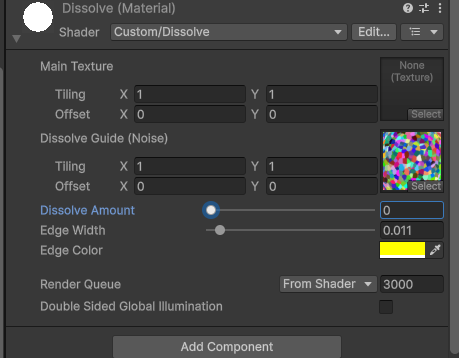
< Material 속성 >
< Shader Code >
Shader "Custom/Dissolve"
{
    Properties
    {
        _MainTex ("Main Texture", 2D) = "white" {}
        _DissolveTex ("Dissolve Guide (Noise)", 2D) = "white" {} // 노이즈 텍스처
        _Amount ("Dissolve Amount", Range(0, 1)) = 0.5         // 진행도 (0~1)
        _EdgeWidth ("Edge Width", Range(0, 0.2)) = 0.05        // 테두리 두께
        _EdgeColor ("Edge Color", Color) = (1,1,0,1)    // 테두리 색상 (HDR 추천)
    }

    SubShader
    {
        Tags { "RenderType"="Transparent" "Queue"="Transparent" }
        Blend SrcAlpha OneMinusSrcAlpha
        Cull Off
        ZWrite Off

        Pass
        {
            CGPROGRAM
            #pragma vertex vert
            #pragma fragment frag
            #include "UnityCG.cginc"

            struct appdata {
                float4 vertex : POSITION;
                float2 uv : TEXCOORD0;
                float4 color : COLOR;
            };

            struct v2f {
                float2 uv : TEXCOORD0;
                float4 vertex : SV_POSITION;
                float4 color : COLOR;
            };

            sampler2D _MainTex;
            sampler2D _DissolveTex;
            float _Amount;
            float _EdgeWidth;
            fixed4 _EdgeColor;

            v2f vert (appdata v) {
                v2f o;
                o.vertex = UnityObjectToClipPos(v.vertex);
                o.uv = v.uv;
                o.color = v.color;
                return o;
            }

           fixed4 frag (v2f i) : SV_Target {
                fixed4 col = tex2D(_MainTex, i.uv) * i.color;
                float dissolve = tex2D(_DissolveTex, i.uv).r;

                // 보정된 Amount: 0~1 범위를 0~1.001 정도로 아주 살짝 넓힙니다.
                // 혹은 clip(dissolve - _Amount - 0.001); 처럼 작성합니다.
                float adjustedAmount = _Amount * 1.01;

                // 픽셀 제거
                clip(dissolve - adjustedAmount);

                // 테두리 계산 (Amount가 1일 때는 테두리도 강제로 제거)
                float edge = step(dissolve - adjustedAmount, _EdgeWidth);
                edge *= step(_Amount, 0.99); // Amount가 0.99 이상이면 테두리 무시

                col.rgb += edge * _EdgeColor.rgb;
                return col;
            }
            ENDCG
        }
    }
}
★☆☆☆☆
반응형
'개발 > Unity) Shader' 카테고리의 다른 글
| Unity Shade) 금,은,동 메탈 포일 효과 (금박 느낌 표현 하기) (0) | 2025.12.16 |
|---|---|
| Unity Shader) 빈티지 필름 효과 내기 (0) | 2025.12.12 |
| Unity Shader) 패턴 이동 (Pattern Move) (0) | 2025.11.23 |
| Unity)Shader Pre-Warm Up 정리 (0) | 2025.09.29 |
| Unity) Shader Graphics API 설정 변경 테스트 방법 (0) | 2025.09.16 |


댓글